Excalibur View: markup and takeoff that stays in your office
Open your drawing sets, measure, and total your takeoff on your own computers. Nothing you draw, measure or share passes through us. Free for one person. Offices buy it once.
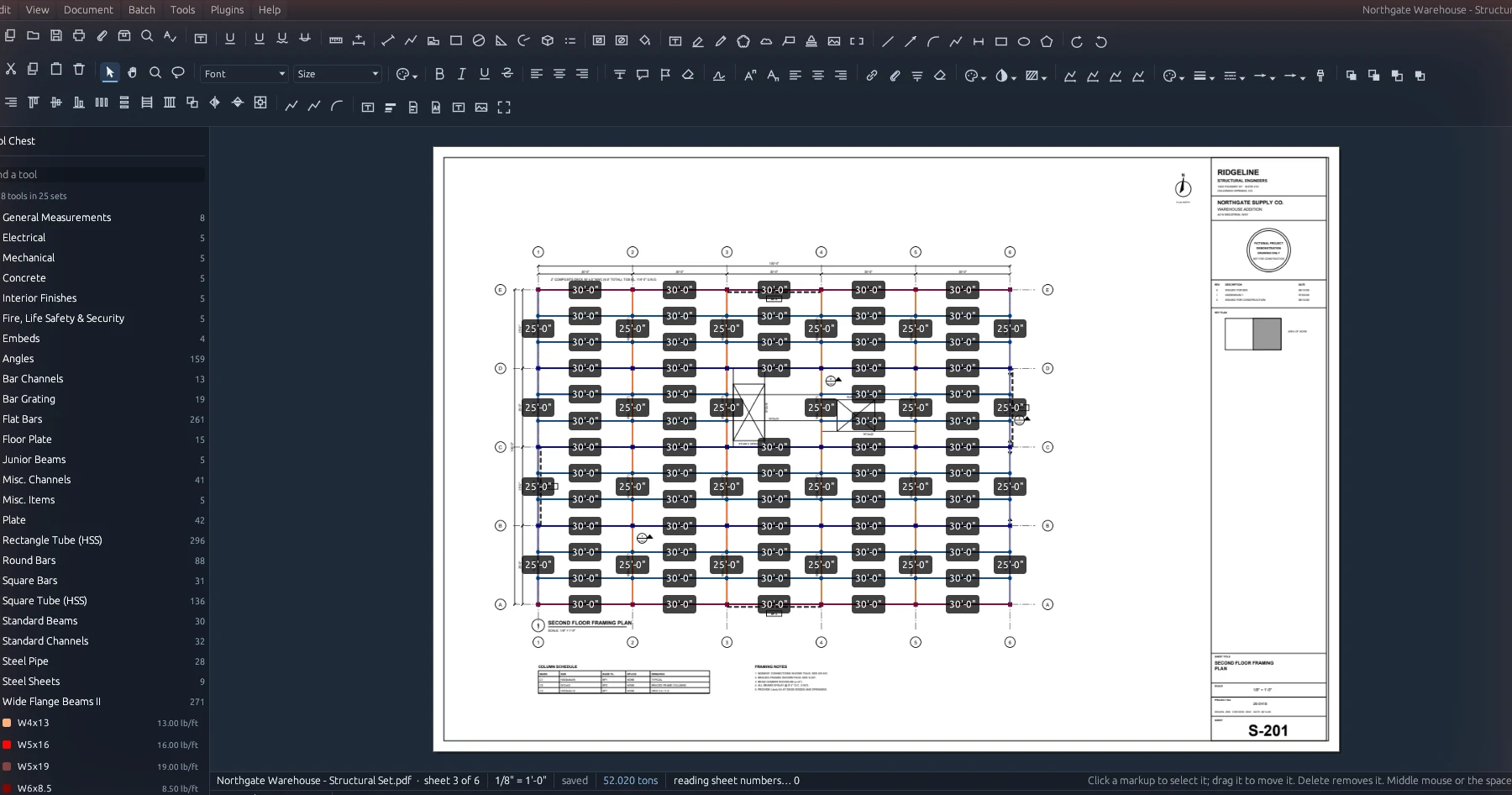
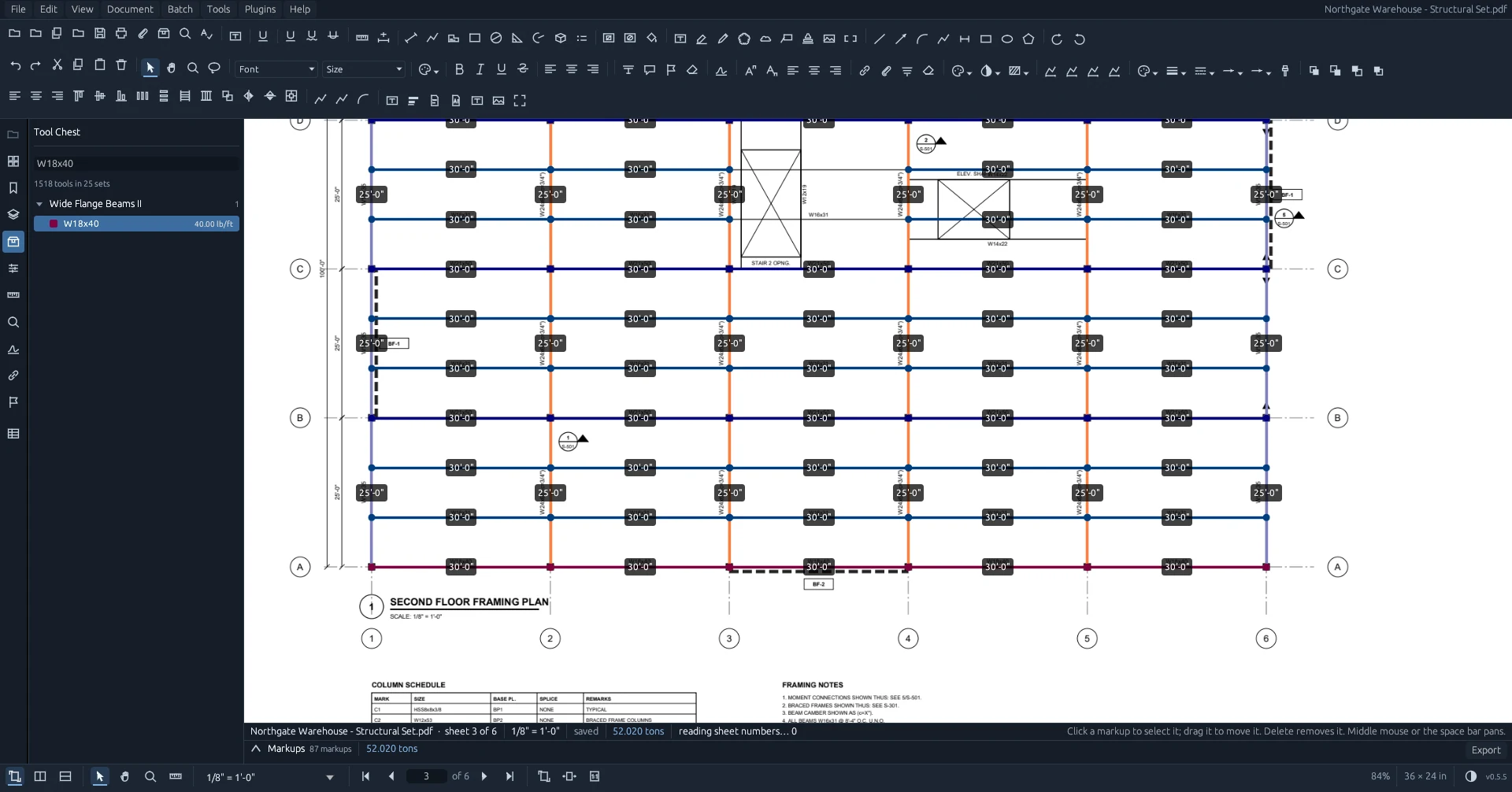
Click the member. Get the length and the weight.
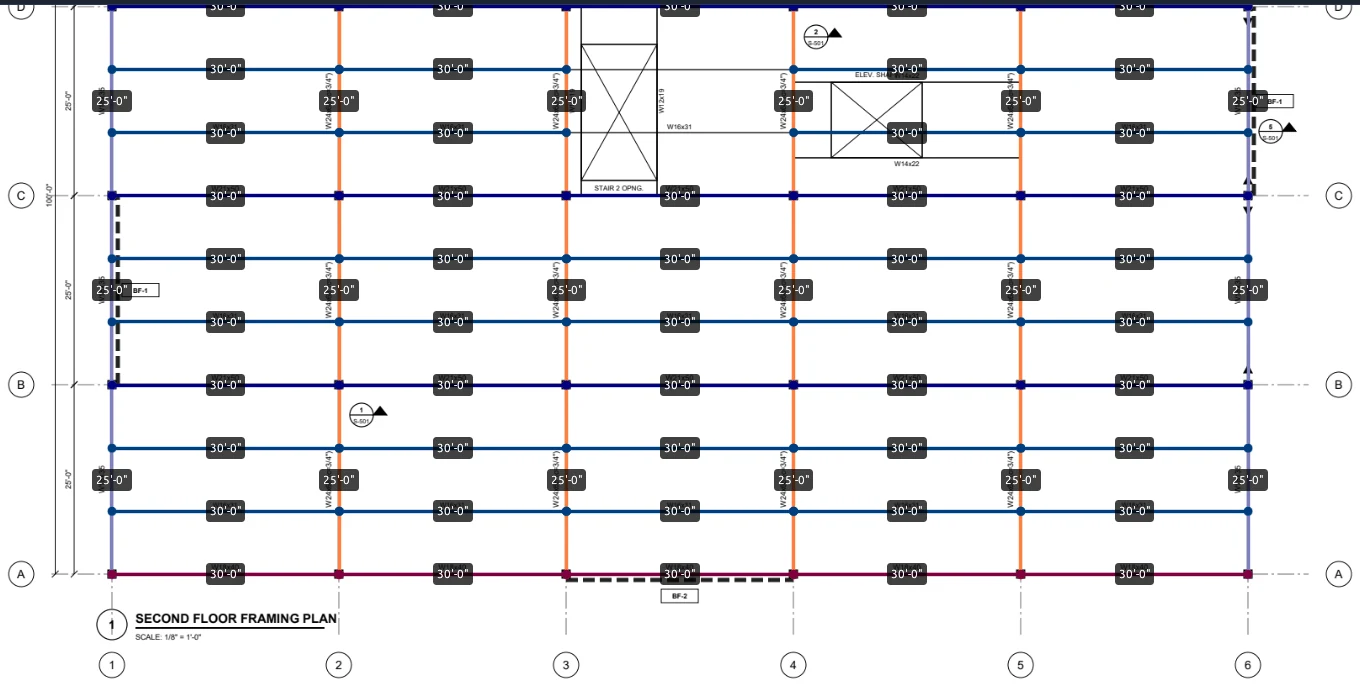
Pick a shape from your tool chest and click along the steel. Bring the .bpx and .btx tool chests you've already built, with their columns and unit weights. Each point snaps to the drawing's own linework: line ends, intersections and midpoints. The length goes on the sheet, and the weight comes from the pounds per foot in your chest.
- Length, polylength, area, perimeter, count, volume, angle and Dynamic Fill
- Put a quantity on a measurement: draw one beam and mark it ×6
- Put a slope on a length to get the true length of a rafter drawn in plan
- Sheets without a scale are flagged and left out of the totals
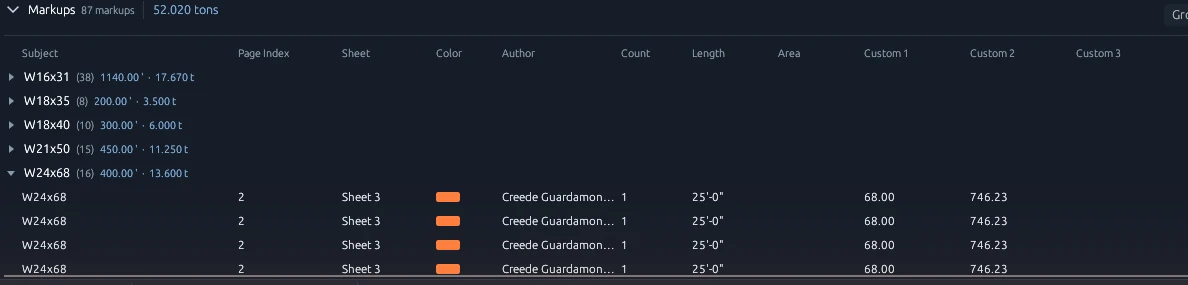
Every piece, grouped and totaled
The markups list sits along the bottom of the window. Group it by subject, sheet, author, status or color, and each group carries its own count, length and tonnage. The totals update as you click.
- Your tool chest's own columns, like LBS per FT and total pounds, by name
- Export to Excel, CSV, PDF, XML, HTML or JSON
- This sheet, this drawing, or every open drawing
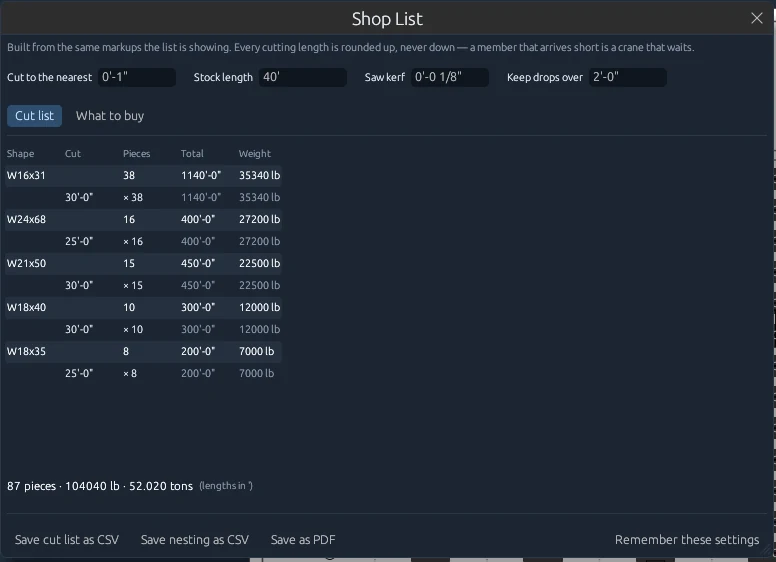
From takeoff to a cut list without retyping
The Shop List turns the same markups into a cut list. Lengths round up to the nearest inch you choose, never down. Enter a stock length and saw kerf, and it nests the pieces into sticks and tells you what to buy and what drops to keep.
There's no default mill length. If you haven't said what stock you buy, it doesn't guess.
Reports built from your clicks
All four are under the Document menu, and all four follow the same rule: every number comes from something a person clicked.
Shop List
The takeoff as a cut list, weighed from your chest, nested into your stock length with the kerf taken off every cut.
Counted Twice?
Finds markups sitting on top of each other and measuring the same thing. It reports them and never deletes anything.
Revision Cost
Put two issues of a set side by side and get a line for each size showing what moved and what it's worth.
Grid locations
Every markup knows it's at B-4, read from the sheet's grid bubbles, and the location prints on the cut list.
One office server. Everyone on the same set.
Office adds a server that runs on one of your own computers. Estimators and PMs open the same drawing sets, and a markup drawn on one screen shows up on the others within seconds.
- One tool chest pushed to every seat
- Reissued sheets replace the old ones and carry the takeoff over, flagged for a check
- User accounts, and the office decides when seats update
- A documented API for your estimating software or ERP
Setup is two files
No license server, no scripts, and no administrator needed on each computer.
1. Install the server
Run the Office server once on your office server or any computer that stays on. It installs as a Windows service and opens the firewall to your office network only.
2. Install each seat
Run the desktop app on each computer. It installs for that person and finds the office server by itself. Nobody types an address.
3. Share the join code
The first person to sign in sets up the office and gets a join code for everyone else. Updates install the next time the app opens, never mid-takeoff.
An assistant that suggests, and never draws on its own
Connect Claude Desktop on your own Claude plan and ask about your jobs: which sheets have no scale, what a reissue changed, or draft RFIs for a sheet. Claude can read a sheet and propose markups. Each one shows up with a Fix button, and nothing is drawn until a person clicks it.
Claude features are optional and need your own Claude plan. Excalibur View is not affiliated with Anthropic.
Ask the office
Jobs, drawing sets, quantities, cut lists and what a revision cost.
Work the window
Open a set, turn to a sheet, read it, and point at what it found.
Propose
Lengths, counts, clouds, notes and a sheet's scale, each with a Fix button.
Undo
Every accepted fix is one step on the Undo list.
We hold nothing
There's no Excalibur cloud. Your drawings, takeoffs, bids and records live on your computers and your servers, and nowhere else.
No cloud to trust
The Office server runs on your hardware, on your network. We never receive your files, so there's nothing on our side to leak, sell or lose.
No tracking
No analytics, no usage reporting and no crash reports sent to us. The only thing the app asks the internet for is whether a new version is out.
No lock-in
Licenses are signed files checked on your own server, offline. Markups are standard PDF, and takeoff exports to open formats. If we disappeared tomorrow, your software and data would keep working.
One ecosystem for the whole job
Excalibur View is the first of a family of open, self-hosted apps for construction. Each one runs on your hardware, keeps your data in your hands, and is bought once.
Excalibur View
Available now. Free for one person, Office for teams.
See ViewExcalibur Citadel
Early access. Bids, drawings, RFIs, daily reports, contracts and a sub portal, on your own server.
See CitadelMore on the way
Built on the same rules: open, self-hosted, and no data held by us. Tell us what your office needs next.
Our approachChoose your edition
Excalibur View
- The full desktop app
- Every markup and measurement tool
- Imports .bpx and .btx tool chests
- Compare, OCR, batch, stamps and seals
- Works with your own Claude plan
Excalibur View Office
- Everything in the free app
- The office server, on your own computer
- Shared sets and live markups
- One tool chest for every seat
- Keeps working if you don't renew
Excalibur View Sealed
- Everything in Office
- No internet connections, by policy
- Updates as signed offline files
- Audit log
- Priority support
Written by a steel estimator
Excalibur View was started by Creede Guardamondo, a project manager and estimator in structural steel in Pueblo, Colorado. It was built around the way a steel office actually does takeoff, starting from the tool chests the estimators already had.
Questions go to hello@excaliburct.com, and Creede answers them.
Try it on your own drawings
Free for one person, with no account. Office is free for 30 days.